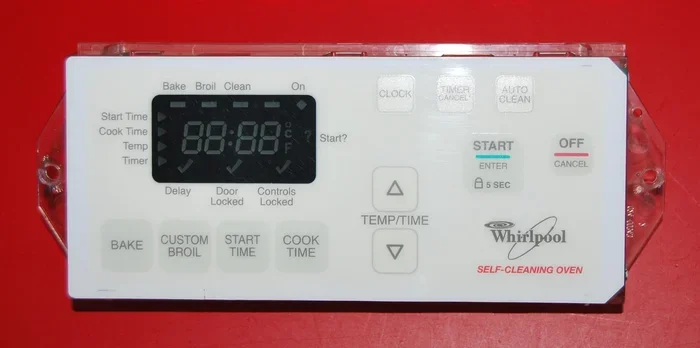
How To Turn Off Loc On Whirlpool Oven Fast And Easy
Turning off Loc on a Whirlpool oven is simple once you know the right steps. The control lock feature is designed to keep your oven safe, but it can be confusing when you need to use it. This guide walks you through every method to disable the lock quickly. You will learn how to identify why the lock is on, the exact button combinations to press, and troubleshooting tips if it does not work. By the end, you will be able to unlock your Whirlpool oven in under a minute.
Have you ever walked up to your Whirlpool oven and found it completely locked? The screen might show a little lock icon, and none of the buttons seem to work. This is the Loc feature, and it can catch anyone off guard. Whether you pressed the wrong button or your kids found the controls, a locked oven is frustrating. The good news is that turning off Loc on Whirlpool oven is much easier than you think.
In this guide, we will walk you through every method to unlock your oven controls. You will learn what the lock feature does, why it activates, and the exact steps to turn it off. We also cover common problems and how to fix them. By the time you finish reading, you will have the confidence to handle this every single time. Let us get your oven back up and running.
Key Takeaways
- Loc means Control Lock: It is a safety feature that disables your oven buttons to prevent accidental use.
- Multiple ways exist to turn it off: You can use button combinations, the control panel, or the reset method depending on your model.
- It takes less than a minute: Most methods require holding a button for 3 to 5 seconds.
- Accidental activation is common: Knowing the quick fix saves you from frustration.
- Contact support if needed: Some issues require professional help, especially with hardware problems.
- Prevention tips help: Simple habits can stop the lock from turning on by accident.
📑 Table of Contents
- What Is Loc On A Whirlpool Oven?
- Why Does The Loc Feature Get Activated?
- Step-By-Step Guide To Turn Off Loc On Whirlpool Oven
- Common Problems When Turning Off Loc And How To Fix Them
- Tips To Prevent Accidental Loc Activation
- When To Contact Whirlpool Support
- Expert Insights On Whirlpool Oven Lock Features
- Quick Tips For Fast Results
- Final Thoughts
What Is Loc On A Whirlpool Oven?
Loc stands for Control Lock. It is a built-in safety feature found on most modern Whirlpool ovens and ranges. When this feature is active, all the buttons on the control panel become unresponsive. The oven will not start, and you cannot change any settings. This is by design, and it serves a very important purpose.
The lock feature prevents accidental button presses. Think about a busy kitchen where kids are running around or where you are multitasking. Without the lock, a stray bump on the panel could start the oven or change the temperature. The Whirlpool oven lock stops that from happening. It is one of those features you do not think about until you need it.
Different Whirlpool models show the lock in different ways. Some display a small padlock icon on the screen. Others flash a “Loc” message. A few models use a lock symbol near the temperature display. No matter how it appears, the result is the same: your oven buttons will not respond. Understanding this feature is the first step to how to turn off Loc on Whirlpool oven quickly.
Types Of Lock Features On Whirlpool Ovens
Not all lock features work the same way. Whirlpool has a few different versions depending on the model year and type of oven. Here are the most common ones you might encounter.
- Control Lock: This disables all panel buttons but does not affect the oven door. You can still open and close the door freely.
- Door Lock: Found on self-cleaning models, this locks the oven door during the cleaning cycle. It prevents burns from hot surfaces.
- Child Lock: A combination of control and door lock designed specifically to keep children safe. It often requires a specific code or button sequence to disable.
- Timed Lock: Some models lock the controls for a set period after a cleaning cycle or a self-clean function finishes.
Knowing which type of lock you are dealing with helps you choose the right method to unlock oven controls. Most people are dealing with the standard control lock, which is the easiest to fix.
Why Does The Loc Feature Get Activated?
The Whirlpool oven lock does not just turn on by itself. There is always a trigger. Understanding why it activates can help you avoid it in the future. Here are the most common reasons.
Accidental Button Press: This is the number one cause. The control lock button is often placed near other frequently used buttons. A quick touch while cleaning the panel or reaching for another button can activate it. The lock button on most Whirlpool models is a dedicated key labeled “Lock,” “L/C,” or “Loc.” One press is all it takes.
After A Self-Clean Cycle: Many Whirlpool ovens automatically engage a lock during the self-cleaning process. The high temperatures inside the oven require a locked door for safety. After the cycle ends, the lock sometimes stays on. This is a very common reason people search for how to turn off Loc on Whirlpool oven.
Power Surge Or Electrical Issue: A sudden power outage or surge can cause the oven to reset and activate the lock as a safety default. This is less common but does happen, especially during storms or when other appliances on the same circuit turn on and off.
Child Activation: Kids are curious. They love pressing buttons, and a control lock is easy to trigger. If your children have access to the oven panel, they might have turned it on without you knowing.
Factory Default Setting: In rare cases, a newly installed oven or a recent reset might come with the lock feature turned on by default. This is a safety measure built into the design.
How To Identify Which Reason Applies To You
Before you start troubleshooting, ask yourself a few simple questions. Did you just finish a self-clean cycle? Has there been a power outage recently? Did children have access to the kitchen? Did you press any buttons near the control panel recently? Answering these questions helps you narrow down the cause. It also helps you decide which method to use for turning off oven lock on your specific Whirlpool model.
Step-By-Step Guide To Turn Off Loc On Whirlpool Oven
Now for the part you have been waiting for. Here are the most effective methods to disable the lock on Whirlpool oven controls. Try them in order, starting with the simplest method.
Method 1: The Standard Button Combination
This is the most common way to turn off the lock. It works on the majority of Whirlpool oven models. Follow these steps carefully.
- Look at your control panel. Find the button labeled “Lock,” “L/C,” or “Loc.” It is usually near the top of the panel or next to the oven timer controls.
- Press and hold that button for 3 to 5 seconds. Do not just tap it. You need to hold it down steadily.
- Watch the display screen. You should see the lock icon disappear or the “Loc” message fade away.
- Try pressing another button. Test by pressing the “Bake” or “Start” button. If it responds, the lock is off.
This method takes less than 10 seconds. It is the go-to fix for most people looking for how to turn off Loc on Whirlpool oven quickly.
Method 2: The Reset Method
If the button combination does not work, the next step is to reset the oven. This clears any temporary glitches that might be keeping the lock active.
- Turn off the oven using the power button. If there is no power button, simply press the “Cancel” button twice.
- Unplug the oven from the wall outlet. Wait for at least 60 seconds. This gives the internal system time to fully reset.
- Plug the oven back in. Wait for the display to light up again.
- Try the lock button combination again. Press and hold the “Lock” or “L/C” button for 3 to 5 seconds.
The reset method works because it clears the control panel memory. Any temporary errors or stuck commands get wiped clean. This is especially helpful when a power surge caused the lock to activate unexpectedly.
Method 3: The Touchpad Reset For Touchscreen Models
Newer Whirlpool ovens come with touchscreen control panels. These models sometimes need a different approach to unlock oven controls.
- Press and hold the “Start” button for 5 seconds. This forces a soft reset on touchscreen models.
- If that does not work, try holding the “Bake” and “Broil” buttons together for 5 seconds. This is a hidden reset combination on many touchscreen Whirlpool units.
- Look for a small pinhole reset button. Some models have a tiny reset hole on the back or behind the control panel. Use a paperclip to press it gently.
Touchscreen models can be a bit more finicky, but these methods work well. Always refer to your specific model’s manual if these steps do not produce results.
Method 4: The Door Latch Release
In some cases, the lock is tied to the oven door latch mechanism, especially after a self-clean cycle. Here is how to handle this.
- Wait for the oven to cool completely. The door lock will not release if the oven is still hot. This is a safety feature.
- Open the door slightly, about one inch. Some models have a manual release latch inside the door frame.
- Press the lock button on the panel. With the door slightly open, try the standard lock button combination again.
- Fully open the door and test the controls.
This method is particularly useful for Whirlpool self-cleaning ovens where the door lock mechanism engages during the cleaning process.
Common Problems When Turning Off Loc And How To Fix Them
Sometimes the lock just will not turn off, no matter what you try. This is more common than you might think. Here are the most frequent problems and their solutions.
The Lock Icon Keeps Coming Back
If you turn off the lock and it immediately turns back on, the control panel might be stuck in a loop. Try this fix. First, unplug the oven for 2 minutes. Then plug it back in and immediately press and hold the “Cancel” button for 10 seconds before trying the lock button again. This breaks the loop and resets the panel logic.
No Buttons Respond At All
If the entire control panel is dead, you might think it is a bigger problem than just a lock. Start by checking the power source. Make sure the oven is plugged in securely. Check your kitchen breaker panel for a tripped switch. If the power is fine, try the reset method described above. A full power reset usually brings the panel back to life.
The Lock Button Does Not Work
If pressing and holding the lock button does nothing, the button itself might be faulty. Try pressing it multiple times quickly. Sometimes a sticky or unresponsive button needs a more firm press. You can also try cleaning around the button with a dry cloth to remove any grease or grime that might be interfering.
Error Code Displayed Along With The Lock
If your oven shows an error code like “F1,” “F2,” or “F9” along with the lock, this indicates a deeper issue. Error codes on Whirlpool ovens point to specific control board or sensor problems. Write down the exact code and search for it on the Whirlpool support website. In many cases, a simple control board reset fixes it. But some error codes require a professional technician.
Lock Stays On After A Self-Clean Cycle
This is the most common scenario. After a self-clean cycle, the door lock can stay engaged for 30 minutes to an hour as the oven cools. If it has been longer than an hour and the lock is still on, try the door latch release method. If that does not work, unplug the oven for 5 minutes and try again. The lock mechanism is designed to release automatically, but sometimes it needs a little help.
Tips To Prevent Accidental Loc Activation
Once you know how to fix the lock, it is smart to prevent it from happening again. Here are some simple habits that make a big difference.
- Keep the control panel clean. Grease and food splatter can make buttons more sensitive. Wipe the panel regularly with a damp cloth.
- Teach children about the lock button. If your kids know what the lock button does, they are less likely to press it by accident.
- Be mindful when cleaning near the panel. When you wipe down the oven front, avoid pressing any buttons. A wet cloth can activate sensors and buttons.
- Use the lock feature intentionally. Only press the lock button when you actually need it. This way, you always know when it is active.
- Know your model’s specific lock sequence. Every Whirlpool model is slightly different. Keep your manual handy or save a digital copy on your phone.
These small habits save you from the frustration of a locked oven when you are ready to cook. Prevention is always easier than fixing a problem.
When To Contact Whirlpool Support
Most lock issues resolve with the methods described above. But sometimes the problem goes deeper than a simple button press. Here is when it is time to reach out for help.
The lock will not turn off after multiple attempts. If you have tried every method and the lock stays active, the control board might need replacement. This is a hardware issue that no button combination can fix.
You see visible damage to the control panel. Cracked screens, loose buttons, or burnt smells are signs of a serious problem. Do not keep trying to force the lock off. Turn off the oven and contact a professional.
Your oven is still under warranty. If your Whirlpool oven is less than a year old, you are likely covered for free repairs. Contact Whirlpool customer service before attempting any DIY fixes beyond the basic reset methods. They can walk you through model-specific steps or arrange a service call.
You are uncomfortable working with electrical appliances. There is no shame in calling a professional. A certified technician can diagnose and fix the issue safely. Look for Whirlpool authorized service centers in your area for reliable help.
How To Reach Whirlpool Support
Whirlpool offers several ways to get help. You can call their customer support line at 1-800-253-1301. You can also visit their website and use the live chat feature. The Whirlpool app also has a support section where you can submit service requests and even schedule a technician visit. Having your model number ready makes the process much faster.
Expert Insights On Whirlpool Oven Lock Features
Understanding your oven’s lock feature is part of being a smart homeowner. The control lock is not a flaw. It is a safety feature that protects your family and prevents accidents. Here are a few expert tips that make a real difference.
First, always read the manual for your specific model. Whirlpool makes dozens of oven models, and each one has slight differences in how the lock works. The manual gives you the exact button sequences and reset procedures for your unit. You can usually find a digital version on the Whirlpool website by entering your model number.
Second, keep a note of your oven’s behavior after every cleaning cycle. If the lock tends to stay on after self-cleaning, note the pattern. This helps you anticipate the issue and act faster next time. It also gives you useful information if you ever need to contact support.
Third, do not ignore error codes. They are your oven’s way of communicating with you. A lock combined with an error code usually points to a specific component that needs attention. Addressing it early prevents bigger problems down the road.
Finally, remember that how to turn off Loc on Whirlpool oven is a skill every oven owner should have. You do not need to be an expert. A few simple steps and a little patience are all it takes. The more familiar you become with your oven’s controls, the less intimidating these situations become.
Quick Tips For Fast Results
- Hold the lock button for a full 5 seconds. A quick tap often does not work. A firm, steady hold is key.
- Try the reset method first if the lock appeared after a self-clean cycle. Unplugging for 2 minutes clears most temporary lock issues.
- Check for a secondary lock button. Some Whirlpool models have a hidden lock feature behind the oven door or on the control lock tab.
- Keep your model number handy. It makes troubleshooting and contacting support much faster.
- Do not panic if the lock stays on after a power outage. A simple reset almost always fixes this.
Final Thoughts
Dealing with a locked Whirlpool oven is never fun, but it is almost always an easy fix. The control lock feature is there to protect you, and knowing how to manage it gives you more control over your kitchen. Whether you use the standard button combination, the reset method, or the door latch release, you now have multiple tools to turn off the lock on your Whirlpool oven quickly and confidently.
Remember that most lock issues are temporary and simple to resolve. The key is staying calm and following the steps in order. Start with the simplest method and work your way up. If nothing works, Whirlpool support is always there to help. You are not alone in this, and the solution is almost always closer than you think.
Take a moment to practice the steps now, even if your oven is not locked. Familiarity makes a huge difference when you are in a hurry or feeling frustrated. Keep your manual accessible, share this guide with family members, and enjoy the peace of mind that comes with knowing exactly how to handle a locked oven. Your Whirlpool appliance is built to serve you well, and with the right knowledge, you can keep it running smoothly for years to come.
Frequently Asked Questions
What does Loc mean on a Whirlpool oven?
Loc stands for Control Lock. It is a safety feature that disables all buttons on the oven control panel to prevent accidental use. When the lock is active, you cannot start the oven or change any settings until it is turned off.
How long does the oven lock stay on after a self-clean cycle?
The lock usually stays engaged for 30 minutes to one hour after a self-clean cycle finishes. This allows the oven to cool down safely. If the lock remains after an hour, try pressing the lock button or resetting the oven by unplugging it for two minutes.
Can I turn off the lock if my Whirlpool oven display is not working?
Yes, in most cases. Try the reset method by unplugging the oven for two minutes and plugging it back in. If the display is completely blank, the lock may reset automatically when power returns. If the lock remains, contact Whirlpool support for further assistance.
Is the Loc feature the same as a child lock?
They are similar but not exactly the same. The Loc feature disables all control panel buttons. A child lock may also include additional safety features like preventing the door from opening. Check your specific model’s manual to understand the full scope of the lock feature on your unit.
What should I do if the lock button is stuck or unresponsive?
Try cleaning around the button with a dry cloth to remove any grease or debris. If the button still does not respond, attempt the reset method by unplugging the oven for two minutes. If neither solution works, the control panel may need professional inspection or replacement.
Do all Whirlpool oven models use the same method to turn off Loc?
Most Whirlpool models use the same basic method of pressing and holding the lock button for 3 to 5 seconds. However, some models, especially touchscreen units, may require a different combination of buttons. Always refer to your specific model’s user manual for the most accurate instructions.
=== CONCLUSION ===
Knowing how to turn off Loc on Whirlpool oven is a simple but essential skill for every oven owner. The control lock feature keeps your kitchen safe, but when it activates unexpectedly, it can feel like a roadblock. You now have multiple proven methods to unlock your oven quickly, from the standard button combination to the full reset method. Remember that most lock issues resolve in under a minute with the right approach. Keep the tips and prevention habits from this guide in mind, and you will rarely face this problem again. Stay calm, follow the steps, and your Whirlpool oven will be back to cooking your favorite meals in no time.