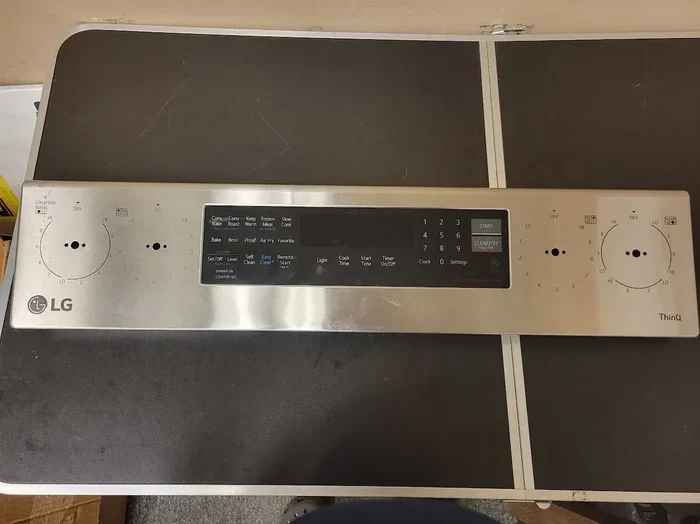
Simple Guide On How To Turn Off Sabbath Mode On Lg Oven
Turning off Sabbath Mode on your LG oven is simpler than you think. This guide walks you through every step, from understanding what Sabbath Mode does to disabling it on your specific LG model. You will learn quick fixes, troubleshooting tips, and expert advice to get your oven back to normal in minutes.
Have you ever walked up to your LG oven and noticed something just feels off? The display looks different. The buttons do not respond the way they usually do. Maybe you accidentally activated Sabbath Mode and now you cannot figure out how to turn it off. You are not alone. Many LG oven owners run into this exact situation, and it can be really frustrating when you just want to cook dinner.
Sabbath Mode is a helpful feature for some users, but it can be confusing if you did not mean to turn it on. The good news is that disabling it is straightforward once you know the steps. This guide will show you exactly how to turn off Sabbath Mode on your LG oven. We will cover what this mode does, why you might want to disable it, and the specific steps for different LG oven models. By the end of this article, you will feel confident and ready to get your oven back to normal.
Whether you have a single oven, a double oven, or a range with a built-in oven, this guide has you covered. We will walk through each step carefully so you never have to guess again. Let us dive right in and solve this problem together.
Key Takeaways
- Sabbath Mode is a special feature: It disables certain oven functions during religious observance periods.
- Turning it off is easy: Most LG ovens let you disable Sabbath Mode through the control panel in just a few steps.
- Model matters: Different LG oven models have slightly different methods for accessing and turning off Sabbath Mode.
- Troubleshooting helps: If the standard steps do not work, a reset or power cycle usually fixes the issue.
- Prevention is key: Understanding how Sabbath Mode activates can help you avoid accidentally turning it on again.
- Consult your manual: Your LG oven user manual has model-specific instructions that are always worth checking.
📑 Table of Contents
- What Is Sabbath Mode on an LG Oven?
- Why Would You Want to Turn Off Sabbath Mode?
- How to Turn Off Sabbath Mode on LG Oven
- Common LG Oven Models and Their Sabbath Mode Settings
- Troubleshooting Tips If Sabbath Mode Won’t Turn Off
- Expert Tips for Managing Sabbath Mode on Your LG Oven
- Key Takeaways
- Conclusion
What Is Sabbath Mode on an LG Oven?
Before we get into the how-to, it helps to understand what Sabbath Mode actually does. This feature is designed for users who observe the Jewish Sabbath, also known as Shabbat. During this religious observance, certain rules restrict the use of electrical appliances. Sabbath Mode on an LG oven helps users comply with these rules by modifying how the oven operates.
Here is what happens when Sabbath Mode is active on your LG oven:
- The oven display may dim or show a special indicator.
- Some buttons become disabled or behave differently.
- The oven may allow temperature adjustments without displaying changes on the screen.
- Automatic shut-off timers and alerts may be disabled.
- The oven avoids turning on or off automatically during the set period.
These modifications make it easier for observant users to keep their food warm or maintain a low temperature without violating religious guidelines. It is a thoughtful feature, and many people genuinely appreciate it. However, if you did not intentionally turn it on, it can cause confusion and limit your oven’s full functionality.
How Does Sabbath Mode Activate?
Sabbath Mode can turn on in a few different ways. Sometimes it happens accidentally when pressing a combination of buttons on the control panel. Other times, a family member or guest may have activated it. In some LG oven models, a long press of a specific button combination triggers the mode. Understanding the activation method helps you avoid turning it on by mistake in the future.
Most LG ovens use a button combination involving the Bake, Broil, or Settings buttons. The exact sequence varies by model and year of manufacture. If you are unsure, check your oven’s user manual. It will list the specific steps to activate and deactivate Sabbath Mode for your particular unit.
Why Would You Want to Turn Off Sabbath Mode?
There are several perfectly valid reasons to turn off Sabbath Mode on your LG oven. Maybe you accidentally activated it while cleaning the control panel. Perhaps a guest in your home pressed the wrong buttons. Or maybe you simply do not need the feature and want full access to all oven functions. Whatever the reason, knowing how to disable it quickly saves time and frustration.
When Sabbath Mode is on, your oven does not work at full capacity. You might notice that:
- The oven display does not show the current temperature correctly.
- You cannot use certain cooking modes like convection or self-clean.
- The control panel locks out specific buttons.
- Timers and alerts do not work as expected.
Turning off Sabbath Mode restores all of these functions to normal. It gives you complete control over your LG oven again. Whether you need to bake a cake, roast a chicken, or just reheat leftovers, having the full range of features available makes cooking much easier.
When Should You Keep Sabbath Mode On?
It is worth noting that Sabbath Mode is not something you always need to turn off. If you or someone in your household observes the Jewish Sabbath, keeping this mode active during those times is perfectly appropriate. The feature exists to support religious practice, and it works well for that purpose. Only turn it off when you need the full functionality of your oven or when the mode was activated by accident.
How to Turn Off Sabbath Mode on LG Oven
Now for the part you have been waiting for. Turning off Sabbath Mode on your LG oven is a simple process. While the exact steps vary slightly depending on your model, the general method is very similar across most LG ovens. Let us walk through the most common approaches.
Method 1: Using the Control Panel Buttons
This is the most common way to disable Sabbath Mode. Follow these steps carefully:
- Make sure your oven is off and not in a cooking cycle.
- Locate the Settings or Options button on the control panel. On some models, this may be labeled as “Options,” “Menu,” or a gear icon.
- Press and hold the Settings button for about 3 to 5 seconds.
- Look for “Sabbath Mode” or “Sabbath” in the menu that appears on the display.
- Use the arrow buttons to highlight “Sabbath Mode.”
- Press the Start or Enter button to select it.
- Change the setting to “Off.”
- Press Start or Enter again to confirm.
Your LG oven should now exit Sabbath Mode. The display should return to its normal appearance, and all buttons should function as usual. If the screen looks normal again, you have successfully turned off the mode.
Method 2: Using the Bake and Broil Button Combination
Some LG oven models use a different method. On these units, you can turn off Sabbath Mode by pressing and holding the Bake and Broil buttons together. Try this:
- Ensure the oven is powered on but not actively cooking.
- Press and hold both the Bake button and the Broil button at the same time.
- Hold them for about 5 seconds.
- The display should show a change indicating that Sabbath Mode has been deactivated.
- Release both buttons once the screen updates.
This method works on many popular LG oven models, including some slide-in and freestanding ranges. If it does not work for your specific model, try Method 1 or check your user manual.
Method 3: Power Cycling the Oven
If the button combinations above do not work, a power cycle can reset the oven and turn off Sabbath Mode. This method is simple but effective:
- Turn off the oven using the power button or by switching it off at the control panel.
- Unplug the oven from the wall outlet.
- Wait at least 60 seconds. This gives the oven’s internal system time to fully reset.
- Plug the oven back in.
- Turn the oven on and check if Sabbath Mode has been disabled.
Power cycling clears temporary glitches and resets the oven’s settings. In many cases, this alone turns off Sabbath Mode and restores full functionality. It is a great first troubleshooting step before trying anything more complex.
Method 4: Using the LG Oven Manual Settings Menu
Newer LG oven models with touchscreen displays offer a dedicated settings menu for managing Sabbath Mode. Here is how to access it:
- Tap the Menu button on the touchscreen.
- Scroll to “Settings” or “Preferences.”
- Look for “Sabbath Mode” in the list of options.
- Tap on it and select “Off” or “Disable.”
- Confirm your selection if prompted.
Touchscreen LG ovens make this process very intuitive. The on-screen menus are designed to be user-friendly, so you should not need any technical knowledge to navigate them. If you get stuck, the on-screen help or user guide within the menu can walk you through the steps.
Common LG Oven Models and Their Sabbath Mode Settings
LG makes a wide range of ovens, and each model may handle Sabbath Mode slightly differently. Below are some of the most common models and how they typically manage this feature.
LG Single Wall Ovens
LG single wall ovens, such as the LMVE5337H and LMVE5337HW models, usually have a dedicated Settings button on the control panel. These models use Method 1 for turning off Sabbath Mode. The control panel layout is straightforward, with clearly labeled buttons that make navigation simple. Most users can disable the mode in under a minute once they know where to look.
LG Double Ovens
Double oven models like the LDE3033ST and LDCE3033ST have two separate control panels. Each oven has its own Sabbath Mode setting. You will need to turn off the mode separately for each oven compartment. The upper oven and lower oven controls work independently, so make sure you check both panels when disabling Sabbath Mode on a double oven setup.
LG Slide-In Ranges
Slide-in ranges from LG, such as the LSG4513ST and LSE4613ST, combine a cooktop with an oven. These models typically use the Bake and Broil button combination to toggle Sabbath Mode. The control panel is located at the front of the range, and the buttons are clearly marked. Hold both buttons for five seconds, and the mode should switch off.
LG Freestanding Ranges
Freestanding LG ranges like the LRG3092ST and LRE3092ST use a similar approach to slide-in models. The control panel is located on the front face of the range. Most freestanding LG ranges respond well to the Settings button method or the Bake and Broil combination for turning off Sabbath Mode.
| Oven Type | Common Models | Primary Method to Turn Off Sabbath Mode |
|---|---|---|
| Single Wall Oven | LMVE5337H, LMVH5337H | Settings button hold and menu navigation |
| Double Oven | LDE3033ST, LDCE3033ST | Settings button on each oven panel |
| Slide-In Range | LSG4513ST, LSE4613ST | Bake + Broil button hold |
| Freestanding Range | LRG3092ST, LRE3092ST | Settings button or Bake + Broil hold |
If your model is not listed here, do not worry. The general methods described earlier should still apply. LG ovens follow similar design patterns across their product lines, so the steps are usually consistent even if the model number is different.
Troubleshooting Tips If Sabbath Mode Won’t Turn Off
Sometimes, despite your best efforts, Sabbath Mode on your LG oven just will not turn off. This can be really annoying, but there are several troubleshooting steps you can try. Most of the time, the issue is simple and easy to fix.
Check if the Oven is Responding
First, make sure your oven is actually responding to button presses. If the control panel is completely unresponsive, Sabbath Mode might not be the issue. Try pressing the Clear or Off button. If nothing happens, the oven may need a power reset. Unplug it for two minutes and plug it back in. This often fixes unresponsive control panels.
Try a Different Button Combination
Not all LG ovens use the same button combination for Sabbath Mode. If the Bake and Broil method does not work, try holding the Bake button alone for 10 seconds. On some models, holding the Settings button for 10 seconds also works. Experiment with different combinations until you find the one that works for your specific oven.
Reset the Oven to Factory Settings
If nothing else works, resetting your LG oven to factory settings can clear Sabbath Mode and any other unusual settings. Here is how:
- Unplug the oven from the power outlet.
- Wait for at least 5 minutes.
- Plug the oven back in.
- Press and hold the Clear button for 10 seconds.
- The oven should restart and return to its default settings.
This process erases all custom settings, including Sabbath Mode. After the reset, your oven should be back to normal operation. You may need to reset your clock and preferred temperature units, but everything else should work fine.
Contact LG Customer Support
If you have tried all of the above steps and Sabbath Mode still will not turn off, it is time to contact LG customer support. They have access to detailed model-specific troubleshooting guides and can walk you through the process over the phone or arrange a service visit if needed. You can reach LG support through their website, by phone, or through their mobile app. Keep your oven model number handy when you call, as this helps the support team assist you more quickly.
Expert Tips for Managing Sabbath Mode on Your LG Oven
Dealing with Sabbath Mode does not have to be a headache. With a few simple habits, you can avoid accidentally activating it and handle it quickly when it does come on. Here are some expert tips that make managing this feature much easier.
Learn Your Specific Model
Every LG oven is slightly different. Take a few minutes to read the section of your user manual that covers Sabbath Mode. Understanding how your specific model handles this feature saves you time and frustration down the road. Keep the manual in a safe place, or download a digital copy from the LG website if you misplaced the physical copy.
Label the Control Panel
If you or someone in your household frequently activates Sabbath Mode by accident, consider placing a small label near the relevant buttons. A simple sticky note that says “Sabbath Mode: Hold Bake + Broil” can prevent accidental activations. This small step makes a big difference, especially in busy kitchens where multiple people use the oven.
Keep the User Manual Accessible
Digital copies of LG oven manuals are available on the LG website. Simply enter your model number in the search bar, and you can download the PDF. Having the manual accessible on your phone or computer means you always have the instructions at your fingertips. This is especially helpful when you need to troubleshoot Sabbath Mode quickly.
Teach Other Household Members
If you share your home with family members or roommates, make sure they know how Sabbath Mode works. Teach them how to activate and deactivate it so they do not accidentally turn it on and then struggle to figure out how to turn it off. A quick 30-second explanation can save everyone a lot of frustration.
Regularly Check Your Oven Settings
Make it a habit to check your oven settings periodically. A quick glance at the control panel when you are cleaning the kitchen can catch Sabbath Mode before it causes problems. This proactive approach keeps your oven running smoothly and ensures you always have full access to all features when you need them.
Key Takeaways
- Sabbath Mode is a helpful feature: It modifies oven functions to support religious observance, but it can be confusing if activated by accident.
- Turning it off is straightforward: Use the Settings menu, the Bake and Broil button combination, or a power cycle to disable Sabbath Mode on most LG ovens.
- Your oven model matters: Different LG oven models use slightly different methods, so check your user manual for model-specific instructions.
- Power cycling solves most issues: If standard methods fail, unplugging the oven for 60 seconds and plugging it back in often resolves the problem.
- Factory reset is a last resort: Resetting your LG oven to factory settings clears Sabbath Mode and all custom settings, restoring normal operation.
- Prevention saves time: Learning how Sabbath Mode activates helps you avoid accidental engagement in the first place.
- LG support is always available: If you cannot turn off Sabbath Mode on your own, LG customer support can provide model-specific guidance.
Conclusion
Turning off Sabbath Mode on your LG oven does not have to be a complicated process. With the right steps and a little patience, you can restore full functionality to your oven in just a few minutes. Whether you use the Settings menu, the Bake and Broil button combination, or a simple power cycle, the method that works for you is just a few steps away.
Remember that Sabbath Mode is a useful feature designed to support religious observance. It only becomes a problem when it is activated by accident or when you do not need it. Now that you know how to turn it off and troubleshoot common issues, you are fully equipped to handle Sabbath Mode on your LG oven with confidence.
Take a moment today to familiarize yourself with your oven’s control panel. Knowing exactly where the right buttons are and how they work makes a huge difference the next time you need to make a quick adjustment. Keep this guide bookmarked for future reference, and you will never have to wonder how to disable Sabbath Mode again. Your LG oven is a powerful kitchen appliance, and with Sabbath Mode properly managed, you can enjoy all of its features without any interruptions.
Happy cooking, and enjoy the full capabilities of your LG oven once again!
Frequently Asked Questions
Can I use my LG oven normally while Sabbath Mode is on?
Sabbath Mode limits certain oven functions to comply with religious observance rules. You may still be able to use the oven at a set temperature, but features like automatic shut-off, display updates, and timer alerts may be disabled. Turning off Sabbath Mode restores full normal operation.
Is Sabbath Mode the same as the child lock feature on LG ovens?
No, Sabbath Mode and child lock are different features. Child lock prevents unauthorized button presses, while Sabbath Mode modifies oven behavior to accommodate religious observance. Both can limit oven functionality, but they serve different purposes and are activated through different methods on LG ovens.
What happens to the oven timer when Sabbath Mode is active?
When Sabbath Mode is active on your LG oven, the timer function may behave differently. Automatic alerts and shut-off timers are typically disabled to prevent the oven from turning on or off during the Sabbath period. Once you turn off Sabbath Mode, the timer returns to its normal behavior.
Can I turn off Sabbath Mode without the oven manual?
Yes, you can usually turn off Sabbath Mode without the manual by trying the common button combinations. The Settings button method and the Bake and Broil hold method work on most LG oven models. If those do not work, a power cycle or factory reset typically resolves the issue.
Does Sabbath Mode affect the oven temperature accuracy?
Sabbath Mode does not directly affect temperature accuracy on LG ovens. The oven will still heat to the set temperature. However, the display may not update to show temperature changes, and some automatic temperature adjustments may be disabled. Turning off Sabbath Mode restores full display and control functionality.
Will turning off Sabbath Mode reset my oven settings?
Turning off Sabbath Mode using the standard methods does not reset your oven settings. Your preferred temperatures, clock settings, and other customizations remain intact. Only a full factory reset will erase all custom settings, so you can safely disable Sabbath Mode without worrying about losing your oven preferences.