Simple Guide On How To Turn Off Frigidaire Oven Light
Knowing how to turn off Frigidaire oven light is a simple skill every home cook should have. Whether the light stays on by accident or you just want to save energy, this guide walks you through every method. You will learn quick fixes, troubleshooting tips, and expert advice for all Frigidaire oven models.
Have you ever walked into your kitchen and noticed the Frigidaire oven light is still glowing even though you are not baking anything? It happens to the best of us. Maybe you closed the door and forgot, or perhaps the light just will not turn off no matter what you do. Either way, it can be annoying and even a little worrying if you are not sure what is going on.
The good news is that turning off the Frigidaire oven light is usually a straightforward process. Most models give you more than one way to handle it. In this guide, we will walk you through every method step by step. You will also learn how to fix common problems and keep your oven running at its best. By the end, you will feel confident handling your oven light like a pro.
Before we dive in, it helps to know a little bit about how your Frigidaire oven works. The interior light lets you watch your food as it cooks. This is super handy when you are making crispy frozen fries or checking on a roast. But sometimes the light stays on when it should not. That is where this guide comes in. We will cover everything you need to know about controlling the oven light on your Frigidaire appliance.
Key Takeaways
- Multiple methods exist to turn off the Frigidaire oven light, including control panel settings and manual switches.
- Understanding your model is key because different Frigidaire ovens have different light controls.
- Common issues like a stuck switch or faulty bulb can keep the light on even when you try to turn it off.
- Regular maintenance helps prevent oven light problems and extends the life of your appliance.
- Energy savings are a nice bonus when you know how to properly manage your oven light.
- Safety first always applies when working with any part of your oven or electrical appliance.
- Consulting the manual is the best first step for model-specific instructions and troubleshooting.
📑 Table of Contents
- Why Your Frigidaire Oven Light Matters
- How To Turn Off Frigidaire Oven Light: Step-by-Step Methods
- Common Reasons Your Frigidaire Oven Light Stays On
- How To Change the Oven Light Bulb on a Frigidaire Oven
- Tips for Maintaining Your Frigidaire Oven Light
- When To Call a Professional for Frigidaire Oven Light Issues
- Energy Savings: Does Turning Off the Oven Light Help?
- Understanding Your Frigidaire Oven Model
- Quick Tips for Everyday Oven Light Use
- Final Thoughts on Turning Off Your Frigidaire Oven Light
Why Your Frigidaire Oven Light Matters
The oven light might seem like a small feature, but it plays a big role in your daily cooking routine. Without it, you would have to open the oven door every few minutes to check on your food. That lets heat escape and can affect cooking times. A working light helps you monitor browning, rising dough, and simmering dishes without any guesswork.
But the light also uses electricity. If it stays on when you are not using the oven, it wastes energy over time. This might not sound like much, but it adds up. Learning how to manage your oven light properly helps you save on utility bills and keeps your appliance running efficiently. Plus, a light that stays on when it should be off can be a sign of a deeper issue that needs attention.
Frigidaire ovens are known for their reliability and user-friendly design. However, like any kitchen appliance, they can have quirks. Understanding how the light system works on your specific model gives you an edge. You will be able to troubleshoot faster and avoid calling a technician for simple issues. Let us now look at the different ways you can turn off the oven light.
How To Turn Off Frigidaire Oven Light: Step-by-Step Methods
There are several ways to turn off the light on your Frigidaire oven. The method you use depends on your model and the type of control panel it has. Below, we cover the most common approaches. Try each one in order until you find the solution that works for your oven.
Method 1: Use the Control Panel
Most modern Frigidaire ovens have a control panel with buttons or a digital display. The oven light is often tied to the oven function itself. Here is how to turn it off using the control panel.
- Step 1: Make sure the oven is not running. Press the Clear or Off button to shut down any active cooking mode.
- Step 2: Look for a light icon on the control panel. It may look like a small light bulb symbol.
- Step 3: Press the light button once. The interior light should turn off immediately.
- Step 4: If the light stays on, try pressing and holding the light button for three seconds. Some models require a longer press.
- Step 5: Check the display for any error codes. If you see one, refer to your manual for guidance.
This method works for most Frigidaire electric and gas ranges. If your oven has a dial-based control, the light may turn off automatically when you set the oven to the off position. Simply rotate the dial to Off and wait a few seconds.
Method 2: Turn Off the Oven Door Switch
Frigidaire ovens have a door switch that controls the interior light. When you open the door, the switch activates the light. When you close it, the light should turn off. But sometimes the switch gets stuck or misaligned.
- Step 1: Open the oven door fully and look for a small switch near the top or side of the door frame.
- Step 2: Press the switch gently with your finger. You should feel a click.
- Step 3: Close the door slowly and check if the light turns off.
- Step 4: If the light is still on, the switch may need cleaning. Use a soft, dry cloth to wipe around the switch area.
- Step 5: Avoid using water or cleaning liquids near the switch. Moisture can damage the electrical components.
The door switch is a simple mechanical part, but it does a lot of work every time you open and close the oven. Over time, grease and food residue can build up around it. This can prevent the switch from working properly. A quick cleaning session can often solve the problem without any special tools.
Method 3: Unplug the Oven
If the light still will not turn off, you can always cut the power. This is the most foolproof method, but it should be a last resort. Unplugging the oven resets all systems, including the light.
- Step 1: Turn off the oven using the control panel first.
- Step 2: Pull the oven plug out of the wall outlet carefully.
- Step 3: Wait at least five minutes before plugging it back in.
- Step 4: Plug the oven back in and turn it on. Check if the light now responds to the controls.
Be careful when unplugging your oven. Make sure your hands are dry and you are standing on a dry surface. If your oven is hardwired into your home electrical system, you will need to turn off the circuit breaker instead. When in doubt, always consult a licensed electrician for safety.
Common Reasons Your Frigidaire Oven Light Stays On
Sometimes turning off the light is not the real issue. The light might stay on because of an underlying problem. Understanding these common causes helps you fix the issue faster and prevents it from happening again.
Faulty Door Switch
The door switch is the most common culprit when an oven light will not turn off. If the switch is broken or worn out, it may send a constant signal to keep the light on. You can test this by opening and closing the door slowly and watching for any delay in the light responding. If the light does not turn off right away, the switch likely needs replacement.
Control Panel Malfunction
Older Frigidaire models may experience control panel issues over time. A glitch in the electronic board can cause the light to stay on even when you press the off button. In most cases, a simple reset (unplugging the oven) fixes this. If the problem continues, the control panel may need professional repair or replacement.
Wiring Issues
Loose or damaged wiring inside the oven can cause the light to stay connected to power at all times. This is a more serious issue that should be handled by a qualified technician. Never try to open the oven’s back panel or access internal wiring yourself unless you have proper training.
Bulb Socket Problems
Sometimes the issue is not with the switch or the panel but with the bulb socket itself. A loose or corroded socket can keep the bulb receiving power even when the light is supposed to be off. If you notice flickering or dimming along with the light staying on, the socket may be the problem.
How To Change the Oven Light Bulb on a Frigidaire Oven
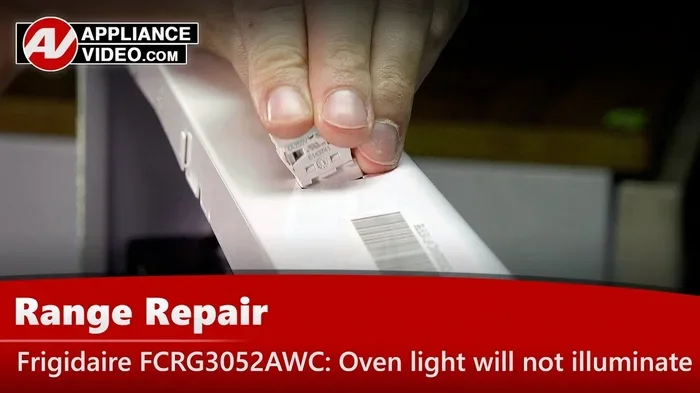
Changing the oven light bulb is a simple task that anyone can do. A burnt-out bulb can also make it seem like the light control is not working. Before troubleshooting the switch or panel, check the bulb first.
Step-by-Step Bulb Replacement
- Turn off the oven and let it cool completely. Never handle the bulb while the oven is hot.
- Locate the bulb cover inside the oven cavity. It is usually at the back or the top of the interior.
- Remove the bulb cover by twisting it counterclockwise. Some models have a small clip that you need to press.
- Take out the old bulb by twisting it counterclockwise. Dispose of it properly.
- Insert the new bulb by twisting it clockwise. Make sure it is snug but do not overtighten.
- Replace the bulb cover and secure it in place.
- Test the light by opening and closing the oven door. The light should turn on and off as expected.
Always use the correct bulb type for your Frigidaire oven. Check your user manual for the recommended wattage and bulb size. Using the wrong bulb can cause overheating or damage to the socket. Most Frigidaire ovens use a standard appliance bulb, which is easy to find at any hardware store.
Once you have replaced the bulb, test the light control again. If the light still does not turn off, the problem is likely with the switch or control panel, not the bulb itself. At that point, you can move on to the troubleshooting steps we covered earlier.
Tips for Maintaining Your Frigidaire Oven Light
Prevention is always better than cure. With a few simple habits, you can keep your Frigidaire oven light working perfectly for years. Here are some practical maintenance tips that every oven owner should follow.
- Clean the interior regularly. Grease and food splatter can build up around the light bulb and affect its performance. Wipe down the oven interior with a damp cloth after each use.
- Check the door seal. A worn-out door seal can let heat escape and affect the oven’s overall efficiency. Inspect the seal every few months and replace it if needed.
- Avoid slamming the oven door. Heavy impacts can damage the door switch and the bulb socket. Always close the door gently.
- Use the right bulb. Stick with the manufacturer-recommended bulb type and wattage. Using a high-wattage bulb can shorten the lifespan of the socket.
- Reset the oven periodically. Just like any electronic appliance, a periodic reset can clear minor glitches. Unplug the oven for five minutes once a month to keep things running smoothly.
These small habits make a big difference over time. They help you avoid common problems and keep your oven performing at its best. Think of it like maintaining a roasting routine where consistency leads to better results every time.
When To Call a Professional for Frigidaire Oven Light Issues
Most oven light issues can be fixed at home with the methods we have covered. But there are times when it is best to call in a professional. Knowing when to stop troubleshooting and get expert help saves you time, money, and frustration.
You should contact a Frigidaire service technician if any of the following apply. First, if you have tried all the methods in this guide and the light still will not turn off. Second, if you notice sparks, burning smells, or unusual sounds coming from the oven. Third, if the control panel displays persistent error codes that do not go away after a reset.
Also, if you are uncomfortable working with electrical components, it is always better to seek professional help. Your safety should never be compromised. A licensed technician can diagnose the issue quickly and make the necessary repairs with the right tools and expertise.
For those of you who love spending time in the kitchen perfecting recipes like oven-baked chicken kebabs, a properly functioning oven light is essential. You need to see your food clearly to get the perfect golden color and texture. Do not let a stubborn oven light get in the way of your cooking passion.
Energy Savings: Does Turning Off the Oven Light Help?
You might wonder whether turning off the oven light actually saves energy. The answer is yes, but the savings are modest. An oven light bulb typically uses between 25 and 40 watts of power. If the light stays on for several hours a day when you are not cooking, those extra watts add up over a month.
Here is a quick comparison to put things in perspective.
| Scenario | Watts Used | Estimated Monthly Cost |
|---|---|---|
| Light left on 4 hours daily | 30W | Approximately $1.50 |
| Light turned off when not in use | 0W | $0.00 |
| Light on during active cooking only | 30W | Approximately $0.50 |
While the savings are small, they are still worth pursuing. More importantly, turning off the light when you do not need it reduces unnecessary wear on the bulb. This means fewer replacements and less waste. It is a small change that contributes to a more energy-efficient kitchen overall.
Think about all the small energy habits you can build in your kitchen. From turning off the oven light to using the right temperature settings, every little bit helps. If you are also looking for ways to improve your oven’s efficiency, you might enjoy learning about commercial electric pizza ovens and how they manage energy usage differently from home ovens.
Understanding Your Frigidaire Oven Model
Not all Frigidaire ovens are the same. The company makes a wide range of models, from basic ranges to high-end double ovens. Each model may have slightly different light controls and features. Understanding your specific model helps you get the most out of your appliance.
To find your model number, check the sticker on the inside of the oven door or the back panel. Write it down and keep it handy. When you need to look up specific instructions or order replacement parts, the model number is your best resource. You can also find your user manual online on the Frigidaire website by entering your model number.
If you have a newer Frigidaire model with a touchscreen or digital display, the light controls are usually built into the main menu. Older models with mechanical dials tend to have simpler light controls that are tied directly to the oven setting. Knowing which type of oven you have helps you approach the light issue with the right strategy from the start.
Quick Tips for Everyday Oven Light Use
Here are some quick, practical tips to keep in mind for daily oven light use. These small habits make a big difference in the long run.
- Get in the habit of checking the light. Before you close the oven door, glance at the light. If it is on and the oven is off, press the light button to turn it off.
- Use the light wisely. You do not need to keep the light on while preheating. Turn it off and only switch it on when you need to check on your food.
- Keep the oven interior clean. A clean oven cavity reflects light better, so you get a clearer view of your food with less effort.
- Replace bulbs promptly. A dim or flickering bulb is a sign that it is about to burn out. Replace it right away to avoid being caught off guard.
- Share the knowledge. If you live with family or roommates, make sure everyone knows how to turn off the oven light. It saves energy and prevents unnecessary wear.
These tips are simple but effective. They take only a few seconds to follow and help you get the most out of your Frigidaire oven every single day. Consistency is the key to keeping any appliance in great shape.
Final Thoughts on Turning Off Your Frigidaire Oven Light
Learning how to turn off Frigidaire oven light is easier than most people think. You have several methods at your fingertips, from simple control panel buttons to door switch adjustments. The key is to understand your specific model and work through the options systematically. Most of the time, a quick fix is all it takes to solve the problem.
Remember to maintain your oven regularly. Clean the interior, check the door switch, and replace bulbs when needed. These small actions go a long way in keeping your appliance in top shape. They also help you avoid frustrating issues like a light that will not turn off.
If you ever feel stuck or unsure, do not hesitate to consult your Frigidaire user manual or reach out to a professional technician. Your safety always comes first. With the knowledge you have gained from this guide, you are now well-equipped to handle any oven light issue that comes your way. Keep cooking, keep learning, and enjoy the confidence that comes with knowing your kitchen appliances inside and out.
Frequently Asked Questions
Why won’t my Frigidaire oven light turn off?
The most common reason is a faulty door switch or a stuck control panel setting. Try pressing the light button on the control panel or resetting the oven by unplugging it for five minutes. If the light still will not turn off, the door switch may need to be replaced.
Can I leave the oven light on all the time?
You can, but it is not recommended. Leaving the light on constantly wastes energy and shortens the bulb’s lifespan. It is best to turn the light off when you are not actively using the oven or checking on food.
How do I know if my oven light bulb needs replacing?
Signs that your bulb needs replacing include dimming, flickering, or the bulb not turning on at all. If the oven light does not work after replacing the bulb, the issue may be with the socket or the door switch rather than the bulb itself.
Is it safe to change the oven light bulb myself?
Yes, it is safe as long as the oven is completely cool and unplugged. Use the correct bulb type recommended by Frigidaire. Avoid touching the glass part of the bulb with bare hands, as oils from your skin can cause the bulb to heat unevenly and break prematurely.
What should I do if the oven light stays on after a power outage?
After a power outage, unplug the oven and wait five minutes before plugging it back in. This resets the control panel and usually fixes any light control issues caused by a power surge. If the problem persists, check the door switch and consult your user manual.
Do all Frigidaire oven models have the same light controls?
No, light controls vary by model and type. Newer digital models may have a dedicated light button, while older models with dial controls may have the light tied to the oven setting. Always refer to your specific model’s user manual for the most accurate instructions.
=== CONCLUSION ===
We have covered everything you need to know about turning off your Frigidaire oven light. From simple control panel methods to troubleshooting common issues, you now have the tools to handle this task with confidence. Remember to check the door switch, use the right bulb, and keep your oven well maintained. These small efforts pay off in the long run by keeping your appliance running smoothly and efficiently. Apply what you have learned today, and you will never have to worry about a stubborn oven light again. Happy cooking!